If your business runs on a legacy system, you’ve probably heard the same advice more than once:
“You need to modernize it before you can add AI.”
Sometimes that’s true.
Often, it isn’t.
A system that’s been running for 10, 15, or even 20 years may still be doing its core job perfectly well. Replacing it just because you want to introduce an AI feature can turn a focused AI project into a multi-year modernization program.
There’s another option.
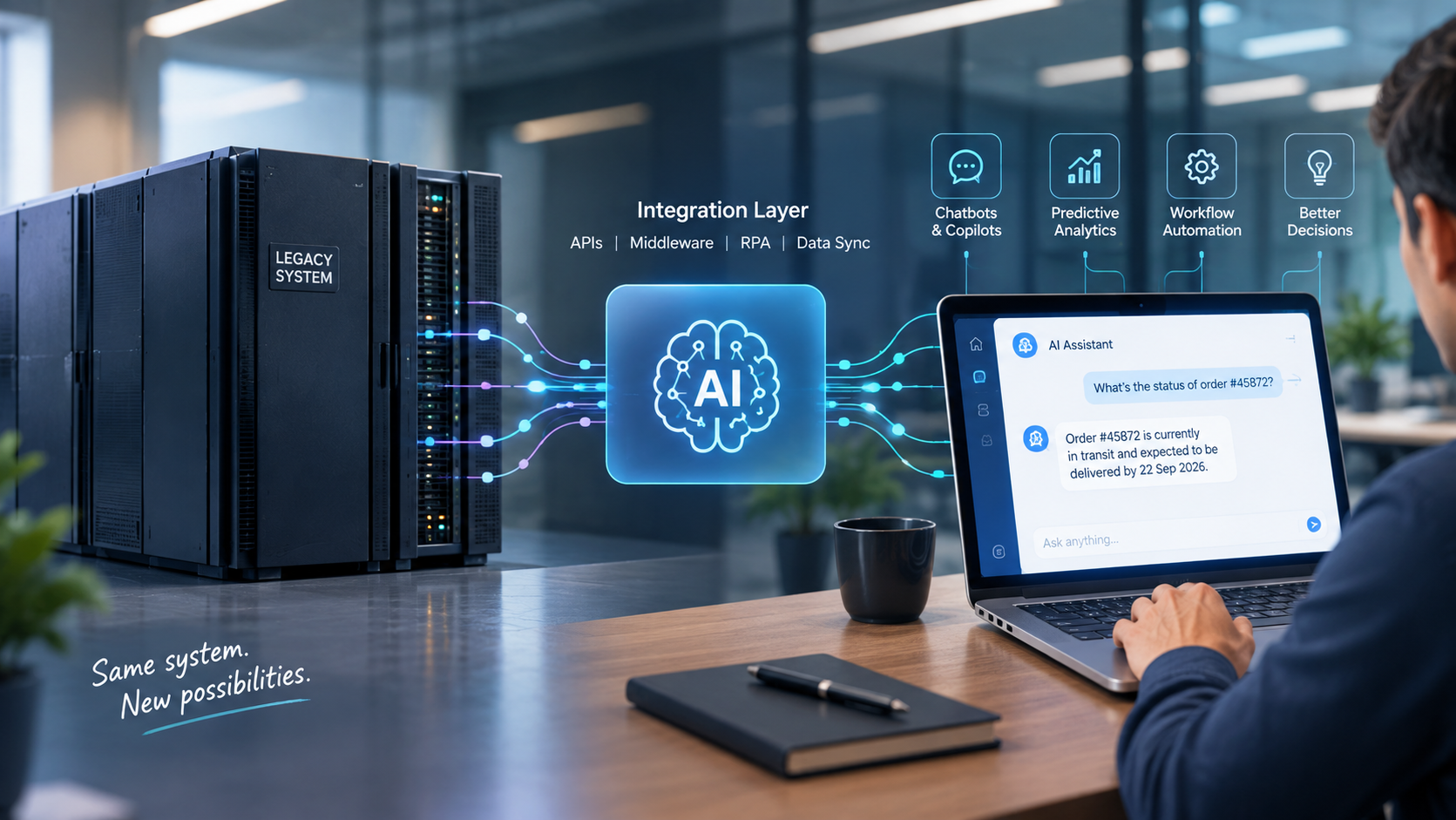
You can leave the legacy system where it is, keep it as the system of record, and put a separate AI layer around it.
We’ve seen engineering teams initially assume that AI integration meant migrating away from their existing platform first. In many cases, the better starting point was much simpler: understand what the existing system can expose, put a controlled integration layer around it, and let AI work through that layer.
The important part is knowing where the boundary should be.
The AI layer should not be allowed to interfere with core legacy logic simply because it can.
Most legacy systems can support a useful AI integration without a complete rewrite if they have some reliable way of exposing their data—an API, database view, file export, middleware connection, or, in some cases, a stable UI that can be automated.
A typical single-use-case pilot can cost around $15,000–$60,000 and take 8–14 weeks. Larger production integrations involving multiple modules and write-back actions can reach $80,000–$250,000+.
The exact numbers depend heavily on the legacy architecture, data quality, security requirements, and the number of systems involved.
Legacy software isn’t disappearing anytime soon. Many organizations still depend on applications that were designed long before today’s AI platforms existed.
That’s one reason we’re seeing more interest in retrofitting AI rather than replacing the entire system first.
The bigger problem is usually data readiness.
A 2026 global survey of 1,550 AI decision-makers found that legacy-system integration complexity was cited by 48.6% of respondents as a blocker to AI initiatives, while 72% said their organizations lacked the unified, accessible data needed for AI projects.
That tells us something important:
The AI model is often not the hardest part. Getting the right data to the model, safely and consistently, is.
It simply means adding an AI capability without replacing the existing application’s core logic.
That AI capability might be:
The legacy application remains the system of record.
The AI layer sits beside it.
For example, imagine a 15-year-old ERP that manages inventory and purchasing. You may not need to rewrite the ERP to build an AI assistant that answers:
“Which products are likely to run out of stock in the next 30 days?”
The AI system can retrieve the relevant inventory, sales, and purchasing data through an integration layer, analyze it, and present the answer to the user.
The ERP continues doing what it has always done.
One common mistake is treating AI integration as nothing more than a data-export exercise.
Export last night’s database into a CSV, send it to an AI system, and call the integration finished.
That might work for some reporting or historical analysis.
It won’t work if the AI needs current information or needs to trigger an action.
If an employee asks:
“What’s the status of this customer’s order right now?”
yesterday’s data isn’t good enough.
And if an AI agent is eventually expected to update an order, create a record, or trigger a workflow, the integration needs much stronger controls than a nightly data dump.
That’s where most of the real engineering work starts.
| Pattern | Best fit | Typical use case | Effort |
|---|---|---|---|
| API wrapper / gateway | Systems with an existing service layer | AI agent that reads order status, inventory, or CRM records | Low–Medium |
| Middleware / ESB bridge | Multiple legacy modules with no shared API layer | Cross-system copilot for support, operations, or finance | Medium–High |
| RPA-driven bridge | Green-screen or UI-only systems | Automating workflows where no API is available | Medium |
| Data replication / warehouse | Reporting and predictive use cases | Forecasting, anomaly detection, analytics copilots | Medium |
RPA has its place.
If the only way to interact with an old system is through its user interface, automating that interface may be the most practical option.
But it shouldn’t automatically be your first choice.
A UI can change.
A button moves. A field gets renamed. A screen behaves slightly differently.
The bot breaks.
So if the legacy system has a reliable API or database-access option, that’s normally worth investigating before putting an RPA layer in front of it.
| Scope | Cost range | Timeline |
|---|---|---|
| Single-use-case pilot (one legacy module, read-only AI feature) | $15,000–$60,000 | 8–14 weeks |
| Multi-module integration with write-back | $80,000–$250,000 | 4–9 months |
| Enterprise-wide AI layer across legacy estate | $250,000+ | 9–18+ months |
These should be treated as planning ranges, not fixed quotes.
The biggest surprise for many teams is that the AI model isn’t necessarily the largest part of the project.
Data cleanup, access control, integration work, testing, monitoring, security, and governance can take considerably more effort than expected.
That’s why we recommend looking at the existing architecture before discussing a final implementation budget.
Don’t position an AI retrofit as an alternative to modernization forever.
Position it as a bridge.
A focused pilot lets the business test whether an AI use case actually delivers value before committing to a large modernization program.
And if modernization eventually happens, the API, middleware, authentication, monitoring, and data-access work created during the pilot may still be useful.
You’re not necessarily throwing the work away.
You’re using a smaller project to reduce the risk of a much larger one.
Before choosing an AI model, find out what the existing system can actually provide.
Look for:
Don’t assume the system has no integration options simply because it’s old.
And don’t assume it has good APIs just because someone says it does.
Test them.
This is where many AI projects go off track.
Someone says:
“We want AI across the entire ERP.”
That’s not a use case.
Start with something specific.
For example:
Ideally, make the first version read-only.
You want to prove that the AI can reliably understand and use the legacy data before giving it the ability to change anything.
It’s easy to spend most of the conversation discussing GPT, Claude, embeddings, agents, vector databases, and prompts.
Those are important.
But they aren’t the foundation.
The integration layer has to deal with things such as:
This layer is effectively the translator between the old system and the new AI capability.
Build it properly.
This is one of the least exciting parts of an AI project.
It’s also one of the most important.
Legacy databases often contain:
AI doesn’t fix bad data.
It can make bad data sound convincing.
That’s considerably more dangerous.
Don’t launch an AI pilot with the goal:
“Let’s see what AI can do.”
Decide what success means before you start.
For example:
Then run the pilot with real users.
A demo can look impressive in a meeting.
Real users will find the problems much faster.
This is where we recommend being conservative.
If an AI assistant can read an order, that’s one thing.
If it can cancel the order, change its value, issue a refund, or modify a financial record, the risk is very different.
Start with human approval.
Once the read-side performance is proven over time and the workflows have been tested properly, selected actions can be automated with appropriate controls.
Don’t give an AI agent write access simply because the API makes it possible.
Even if the retrofit works well, document it properly.
Someone should be able to understand:
That’s important because your AI integration may outlive the legacy application itself.
| Factor | Retrofit AI onto legacy | Rebuild / modernize first |
|---|---|---|
| Time to first AI feature | 8–14 weeks | 12–24+ months |
| Upfront cost | Lower for a focused pilot | Higher |
| Best when | Legacy core is stable and has a usable data-access path | Legacy system is failing, unsupported, or extremely difficult to integrate |
| Long-term ceiling | Limited by legacy data and architecture | Higher potential with a new architecture |
| Main risk | Carrying legacy constraints into the AI layer | Large cost, timeline, and migration risk |
There isn’t one correct answer for every company.
If the existing system is stable and exposes the information you need, a retrofit may make sense.
If the system is already failing, unsupported, or impossible to integrate safely, adding another layer may simply postpone the underlying problem.
Before signing an AI integration proposal, ask these questions:
That last question can reveal quite a lot about whether the vendor understands the project.
Retrofitting isn’t always the answer.
If the legacy system has no meaningful data-access path—no API, no usable exports, no database access, and no stable interface to automate—then you’re going to spend a lot of time building around the system before you even get to the AI feature.
In that situation, a targeted modernization of the data or integration layer may make more sense than trying to wrap AI directly around the application.
There’s another warning sign: instability.
If the legacy system is already missing SLAs, running on unsupported infrastructure, or frequently failing, adding an AI dependency doesn’t solve that problem.
It gives you another dependency.
And write-back deserves particular caution.
An AI agent that can modify records inside a critical system of record needs strong controls, clear permissions, audit trails, and a proven track record.
Retrofitting AI is worth considering when:
If several of these aren’t true, don’t force an AI retrofit just because AI is on the roadmap.
Fix the underlying constraint first.
At Arka Softwares, we don’t start these conversations by choosing an AI stack.
We start by looking at the system you already have.
What can it expose?
What data is actually reliable?
What can be accessed safely?
Where can an AI layer sit without disturbing the existing application?
That’s particularly important with older .NET applications, database-driven systems, custom enterprise software, and platforms where replacing the core application isn’t realistic in the short term.
We’ve worked on API and middleware integrations connecting older platforms with newer applications and automation layers.
And sometimes the right answer isn’t “add AI.”
Sometimes it’s:
“We need to fix this part of the architecture first.”
We’d rather identify that early than sell an integration that looks good in a proposal and becomes difficult to maintain six months later.
You don’t necessarily need to rewrite a legacy system to start using AI.
In many cases, the smarter first step is much smaller:
Understand the existing system → expose the right data → add a controlled AI layer → prove one use case → then expand.
The important question isn’t:
“Is our system too old for AI?”
It’s:
“What can our existing system safely expose, and what useful AI capability can we build around it?”
If you want to evaluate your own system, bring your current architecture diagram, a rough description of the data you need to access, and the AI use case you’re considering.
That is usually enough to determine whether you need a full modernization—or whether you can start with a much smaller integration.
Book a call with Arka Softwares
Sometimes, but rarely with absolutely no technical changes.
An API gateway, middleware layer, or RPA solution can keep the legacy application’s core code untouched. However, you will usually still need some configuration, adapters, permissions, or integration work around it.
The older the system and the fewer integration options it has, the more work this usually requires.
A focused, read-only pilot can typically take around 8–14 weeks.
A larger implementation involving multiple modules, complex data integration, and write-back capabilities can take considerably longer—often several months.
The timeline depends more on the existing architecture and data than on the AI model itself.


Jeeto11
The app quickly earned over 1,000 downloads within two months of launch, and users have responded positively. ARKA Softwares boasted experienced resources who were happy to share their knowledge with the internal team.

Archithrones
While the development is ongoing, the client is pleased with the work thus far, which has met expectations. ARKA Softwares puts the needs of the client first, remaining open to feedback on their work. Their team is adaptable, responsive, and hard-working.

Service Provider
I started my project with Arka Softwares because it is a reputed company. And when I started working with them for my project, I found out that they have everything essential for my work. The app is still under development and but quite confident and it will turn out to be the best.